|
TranslateCAD®
Extracts the Translatable Text
From Any AutoCAD® Drawing, Creating a Plain-Text File
That You Can Translate Using Any CAT Tool, Taking Advantage of
Your Existing Translation Memories, Glossaries, and Even
Outsource the Plain-text Translation to Other Colleagues.
Download trial version
With
TranslateCAD® you only need to invest
5 extra minutes processing your
AutoCAD® DXF files and you're ready to translate in
plain-text format
using your favorite CAT tool. (You may use Trados, SDLX, Wordfast,
DejaVu, or any other CAT software that supports plain text in Unicode
format).
You may translate AutoCAD® drawings' text even if you don't have
AutoCAD® installed. (Although it's recommended that you do a
double-check and re-formatting with AutoCAD® after the text has been
processed with TranslateCAD®.)
TranslateCAD® supports Unicode
to allow you translate virtually any possible language including
Chinese, Japanese, Hindi, Hebrew, Arabic, etc. (Note: You and the
customer need to have the corresponding Unicode True Type Font
installed).
The
unregistered version is yours to keep, and you may use it to count
words within AutoCAD DXF Drawings (without size or word limit) and to
translate the first 50 words of any AutoCAD® drawing regardless of its
size.
Or... you may
register and get your license to unlock the software and translate an unlimited number of words within any drawing.
In order to purchase your license,
please
download the software (trial
version) and the software will show
a button for you to buy it.
It will more than pay for itself
on your next AutoCAD® translation project.
Get
your license key today! for only $34.95
$29.00
USD
Download trial version
|
Customer
Testimony:
"TranslateCAD allowed me to work on a large project with about 800 DXF
files. This is a great software and the support is simply
prompt, reliable and friendly."
Dr.
Waldemar Labusga - Mendoza, Argentina
|
How
does Translate CAD works?
|
1
|
|
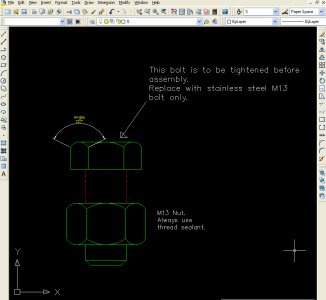
Extract the translatable text with
TranslateCAD® as a plain-text Unicode file.
(Download
Sample Files)
|
|

|
|
|
2
|
|
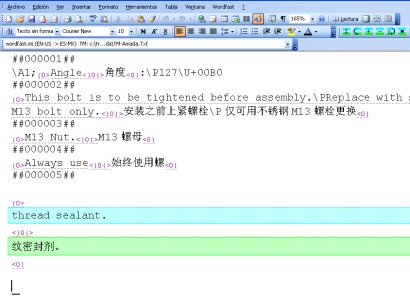
Translate using your favorite CAT (Computer Assisted Translation)
software and your own translation memories & glossaries.
(Download
Sample Files)
|
|
|
|
|
3
|
|
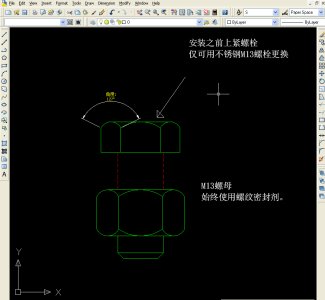
Create the target translated DXF drawing using
TranslateCAD® again and open it in AutoCAD® for further editing/revision.
(Download
Sample Files)
|
TranslateCAD® Software Features:
• Lets you translate AutoCAD® DXF drawings of
all versions - from AutoCAD®
R12 to AutoCAD® 2015
• Compatible with all current versions of Windows® (98/95, XP, Vista, Window 7 and Windows 8.x)
• Very small
size; installation package is only
225 KB and requires only 226 KB of your Hard Disk
(including documentation)
Download
it here.
• Stand-alone executable software. Does not install conflicting DLLs or any other frameworks or libraries
•
Free updates for life. There is no
need to buy licenses every year for
new versions. Your same license key
will still be working in our future
versions.
Try it yourself!
Download TranslateCAD® today and see how it can save many hours of your valuable time.
The trial version is fully functional up to the first 50 words of any
DXF file. It can even count the words in your drawings. Plus it never
expires. You may use it freely for drawings with little text even if
the DXF files are several Megabytes in size.
Download
the Trial Version Now
Download trial version
|